Tuesday, March 24, 2020

Why is it hard to make sustainable practices stick?

I've been thinking about this problem for a while.

It's hard to make sustainable software development practices stick. The larger an organization is, the harder it seems to be.

Why?

There are many possible answers and probably all of them have at least a little validity.

  • It's way easier to learn a computer language than it is to learn how to properly attend to design.
  • Refactoring (true refactoring) is hard to learn, too.
  • TDD requires significant effort to figure out how to apply meaningfully.
  • BDD requires organizational changes to make its biggest impacts.
  • Larger organizations have politics.
  • Larger organizations have communications and handoffs.
  • Larger organizations have often deadlines that aren't linked with capacity or value.

All of those are at least somewhat true, some of the time, but none of them smells very much like a root cause. Maybe there isn't a single cause and that's why it's hard to pin one down. In fact, that's probably true, but I still feel like the above list (and its ilk) is a list of symptoms of some other problem, not a list of first-class problems.

Yesterday's blog entry helped me make a little progress in the form of a new hypothesis we can at least invalidate.

As I said, I automate everything because I know I can't afford to do otherwise. In fact, that's the reason why I apply modern software design principles. It's why I refactor. It's why I have a test-driven mindset and why I write tests first whenever I can. I'm on a shoestring budget and I know I can't spare anything on wasted effort, so I work as efficiently as I can.

What if the reason why larger organizations ostensibly tend to struggle with code quality, design patterns, refactoring, TDD, agile workflow, and lean product definition is as simple as the inverse statement? I know I don't have the budget to work inefficiently, so I work efficiently. Larger organizations have the budget to work inefficiently, so they don't work efficiently?

It sounds crazy. At least, it would have to my younger self.

"People are working in an unsustainable way just because they think they can afford it? What?!?" That's what young Max would have said. Today Max really only has a resigned shrug to offer in dissent.

So, because Old Max put up such feeble resistance, let's explore the idea a little more.

A small organization is usually comprised of* a tight-knit group of individuals. While they may not all be experts in every area of work, the impact of any person's decisions can be plainly seen in day to day activities. This means that the costs of bad decisions are not abstracted debts to be paid someday. They are real problems being experienced at the moment.

Pair that with the tight budget that smaller companies usually have, and you get a recipe for action: the plainness of the problem helps people know what should be done and the necessities of a small budget provide the impetus to do it.

Contrast that with a large organization.

In a large organization, consequences or often far-removed from actions. If you create a problem, it may be weeks, months, or even years before you have to pay the cost. That's if it doesn't become someone else's problem altogether, first. Fixing a systemic problem such as, say, not being test-driven can be imagined as this high-minded "nice to have" that probably won't really work because you'd need everyone to be on board, which will never happen because everyone else feels the same way.

At the same time, pockets are often quite deep in large organizations. While a show may be made of pinching pennies in the form of (for instance) discount soap in the bathrooms, they tend to spend a lot on wasted effort. They are able to do this because they have some array of already-successful and (typically) highly profitable products they can exploit to fund new efforts. Furthermore, in addition to being very large, corporate budgets seem like they are usually very complex. Large costs can sometimes seem smaller than they really are because they are impacting many different line items.

Pair those two together and you get fatalistic ennui making everything seem academic with a budgeting apparatus that consistently says "we've got bigger fish to fry".

I'm pretty sure this is one piece of the puzzle but I think there's more to it. For instance, there are many small organizations with shoestring budgets that still make bad decisions about sustainability. There are also counterexamples in the form of large companies that tend to make decisions that are good, or at least better than those of their competitors.

However, this writing is now quite long. So I'm going to end it, here, and discuss another factor in tomorrow's entry.

*: That is one of the correct usages of "to comprise". Look it up.

Monday, March 23, 2020

My pipeline brings all the builds to the prod

The title is a reference to a song I only know exists because of this clip from Family Guy.

Dwindle is a one-person operation, right now. Eventually, I might pull my wife into it but she doesn't have any time to dedicate to anything new, right now.

We have a two-year-old, a four-year-old, various other business interests, a house that seems to require constant repairs, and, until the recent panic, a reasonably busy consulting practice.

So time is at a premium.

For now, it's just me and I don't get a full forty hours a week to work on Dwindle. Before I got sick, I was lucky to have twelve. Obviously, last week, my time available to work was right around zero hours.

Still, in those twelve hours per week, I managed to build and maintain an automated pipeline that carries Dwindle all the way from check-in to automated deployment and, ultimately, promotion to production environments.

The pipeline covers everything...

  • Building and testing binaries for the core logic of the game.
  • Building and testing the backend API.
  • Building the clients.
  • Acceptance/integration testing the clients.
  • Deploying to a "blue" or "staging" environment.
  • Validating the blue/staging deployments.
  • Promoting from blue to "green" or "production" environments.
  • Cleaning up old deployments where applicable.

It manages parallel deployments in different environments:

  • Azure Functions & Storage for the backend.
  • Google Play for the Android app.
  • Kongregate for the browser version.

It keeps everything in sync, ensuring each of the following:

  • No blue deployments occur until all tests for every component have passed
  • No deployment validations occur until all blue deployments are completed
  • No release to production begins until all promotion candidates have been validated.

This is no mean feat for a Unity application. It's more work than, say, a web application or even a normal Windows or mobile app. Unity makes every traditional software development task harder - probably because they are solving a different problem than the traditional app-development problem.

Even an automated build of a Unity game is a lot harder than automated builds of Xamarin or native-coupled apps would be. Acceptance testing your game is hard, too. Everything that isn't making a pretty shape on the screen is much more difficult than it would be with a more traditional tech stack.

I did it anyway. I did it when it was hard and seemed like it would only get harder. I did it when it looked like I had an endless churn of tasks and felt like solving the next problem would just beget two more.

Even when a little voice in the back of my head began to whisper "Hey... maybe it's not so bad to do that part manually," I did it. I pushed past the little voice because I knew it was lying to me.

If I can do it, alone and beset on all sides by two very-high-energy youngers, you can do it while you're sitting at your desk in your large, reasonably-well-funded corporate office (or home office).

...but that's not very important, is it?

We shouldn't do things just because we can, right?

I need a legitimate reason and I have one. It's not just that I can do it. It's that I absolutely need a completely automated pipeline.

I couldn't possibly afford to build Dwindle into something successful if I was spending all my time manually testing and manually promoting builds. I'm not saying I will make Dwindle a financial success but my chance would nil if I was just wasting all my time on those things. Most of my time would go to validating a handful of changes. I wouldn't have any time left over to hypothesize, innovate, or develop new features.

The marginal cost of investing in proper automation is negative. While this may be impossible when talking about manufacturing, it's one of the most basic principles of software development: Investing in things related to quality lowers costs.

So I built a fully automated pipeline with a mix of integration and unit tests for a very simple reason: You spend less to have a fully automated pipeline than you do without one.

...and if I can spend less to have one alone, you certainly can do it with a team.

Friday, March 20, 2020

Parsing SVG documents into useful layout specifications

In a previous post, I discussed using SVG documents to specify layouts in a Unity app. More recently, I started delving into that subject and laid out a list of things to cover:

  1. How to make the SVG easy to interpret visually.
  2. How to convert the SVG into a set of rules.
  3. How to select the right rules given a query string.
  4. Generating an SVG that explains what went wrong when a test fails.

Among the many things I deferred was how to actually parse the SVG into a set of layout constraints.

Both #2 and #3 are pretty simple and they are strongly related, so I'll handle them in this text.

Thursday, March 19, 2020

Unit testing versus integration testing: I'm starting to reconsider my position

An impossible structure in an assembly diagram as might come with cheap furniture.


For a long time, I have rejected integration tests as overly costly and with very little benefit. Friends of mine have a similar argument about unit testing. They say that it does very little and slows you down.

I'm still not sold on the "unit testing slows us down" position. The negative side effects people mention (like impeding refactoring) line up more with testing implementation details than with unit testing, itself.

However, in the modern era, I'm starting to come around on integration testing.

First, I'll lay out my reasoning for why unit testing is better:
  1. Properly specifying how each individual behavior works allows you to build a foundation of working behaviors.
  2. Defining behaviors relative to other behaviors (rather than as aggregations of other behaviors) stems proliferation of redundancy in your test code.
  3. How two or more behaviors are combined in a certain case is, itself, another behavior; see #1 and #2.
I still believe all of that. If I had to choose between only unit tests or only integration tests, I would choose only unit tests.

In addition to providing better feedback on whether or not your code (the code you control) works, they also help shape your code so that defects are harder to write in the first place. By contrast, when something you wrote breaks, an integration test failing unlikely as it's very hard to create exhaustive coverage with integration tests. Furthermore, even if an integration test does fail, it's not very helpful, diagnostically-speaking.

Yet, I don't have to choose. I can have both. As we've seen in previous posts and will continue to see, I can have one scenario be bound as both.

So what is it that integration tests tell us above and beyond unit tests. My unit testing discipline makes sure that I almost never break something of mine without getting quick feedback to that effect. What do integration tests add?

The spark of realization was a recent discovery as to why a feature I wrote wasn't working but the evidence has been mounting for a while, now.  It took a lot of data to help me see the answer even though to you it may prove shockingly simple and maybe even obvious.

Over the last year or so, a theme has been emerging...

  • A 3rd party layout tool has surprising behavior and makes my layouts go all wacky. So I have to redo all my layouts to avoid triggering its bugs.
  • "Ahead of time" code fails to get generated and makes it so I can't save certain settings. I have to write code that exercises certain classes and members explicitly from a very specific perspective in order to get Unity actually compile the classes I'm using.
  • A Google plugin breaks deep linking - both a 3rd-party utility and Unity's built-in solution. I have to rewrite one of their Android activities and supplant the one they ship to make deep linking work.
  • A "backend as a service" claims that its throttling is at a certain level but it turns out that sometimes it's a little lower. I have to change how frequently I ping to something lower than what they advise in their documentation.
  • A testing library is highly coupled to a particular version of .NET and seems to break every time I update.
  • Et cetera. The list goes on...and on...and on.

Unit tests are good at catching my errors but what about all the other errors?

When you unit test and do it correctly, you isolate behaviors from one another so that each can be tested independently from another. This only works because you are doing it on both sides of a boundary and thus can guarantee that the promises made by a contract will be kept by its implementation.

That breaks down when you aren't in control of both sides of the contract. It seems like we live in unstable times. You simply can't count on 3rd party solutions to keep their promises, it seems.

This realization led me to a deeper one. It's about ownership. If you own a product, your customer only cares that it works. They don't care about why it doesn't work.

Telling them "a 3rd-party library doesn't function as promised and, as a result, deep links won't work for Android users. I'm working on it," sounds worse than just saying "Deep links don't work for Android users, I'm working on it." What they (or, at least, I) hear is "Deep links don't work for Android users. Wah, wah, wah! It's not my fault! I don't care about your inconvenience. I only care about my inconvenience. Feel sorry for me."

Even though you don't own 3rd-party code, to your customers, you may as well. You own the solution/product/game in which it is used and you own any failures it generates.

That extends well beyond whether or not the 3rd-party component/service works. It includes whether or not a component's behavior is represented correctly. It includes whether or not you used it appropriately. It even includes the behavior of a component or service changing in a surprising way.

So I finally realize the point of integration testing. It forces you to deal with the instability and fragility of the modern software development ecosystem. It's not about testing your code - that's what unit tests are for - it's about verifying your assumptions pertaining to other people's code and getting an early warning when those assumptions are violated.

Integration testing - whether it's how multiple microservices integrate or how all your components are assembled into an app - is essential. Just make sure you are using it to ask the right questions so you can actually get helpful answers:

"Is this thing I don't control properly functioning as a part of a solution I offer?"

Wednesday, March 18, 2020

The pains of being flexible

I ran a build with some pretty simple refactors as the only changes. I expected it to pass. The only reason the build even ran was that I checked in my changes.

Yet the build didn't pass. It failed with a bizarre error. SpecFlow was failing to generate code-behind files.

Some research made it clear that this was really a function of SpecFlow not working very well with .NET 3.1.200. The surprising thing about that was that I didn't remember switching to 3.1.200.

The fault actually was mine. At least, it was in a circuitous way. It was an artifact of a decision I made while defining my pipeline:

  - task: UseDotNet@2     displayName: 'Use .NET 3.1'     inputs:       version: 3.1.x       installationPath: '$(Agent.ToolsDirectory)\dotnet\3.1'

I intentionally chose to allow updates automatically with that little ".x" and it burned me.

Sure enough, a tiny change "fixed" my broken pipeline:

  - task: UseDotNet@2     displayName: 'Use .NET 3.1'     inputs:       version: 3.1.102       installationPath: '$(Agent.ToolsDirectory)\dotnet\3.1'

I'll definitely leave it that way until I have a reason to change it.

What I don't know, at this time, is if I'll go back to allowing the maintenance version to float, when I finally do make a change.

Is it better to have the stability of a known version or to get the fixes in the latest version without having to do anything?

Right now, my inclination is toward faster updates, still. For an indie game-development shop with a disciplined developer who jumps on problems right away, it's probably better to get the updates in exchange for the occasional quickly-fixed disruption.

That said, if I get burned like this a few more times, I might change my mind.

Tuesday, March 17, 2020

Making an SVG shape specification easy to interpret visually.

In my most recent post, I deferred describing how I parsed an SVG document to another post.

There are multiple subtopics:

  1. How to make the SVG easy to interpret visually.
  2. How to convert the SVG into a set of rules.
  3. How to select the right rules given a query string.
  4. Generating an SVG that explains what went wrong when a test fails.

I will attempt to address them all in separate posts. Like the rest of the world (at the time of this writing), I'm recovering from illness. So I'll do an easy one, now, and the rest will have to wait.

First up, how to make the SVG easy for a person to understand.

This part is all about SVG, itself. I started out with a single document that looked pretty raw - just some white rectangles on a black background. Over time I accumulated more documents and evolved them into something more palatable.

Those mostly involved the use of stylesheets and definitions but also, after much experimentation, I discovered that polyline was the most effective tool to create the shapes I wanted. I'll explain why in a bit.

First, let's look at a single polyline element:

<polyline id=".inner" points="80,192 80,1000 1860,1000 1860,192 80,192 80,193" />

That's a rectangle with its first two vertices repeated. For the test, I only need the first three points - the rest of the parallelogram is inferred.

However, to create the visual effect of a bounding box with little arrowheads pointing inward at the corners, I needed the extra points. At least, I couldn't figure out how to do it without the extra points.

I could only get the orientation of markers on inner vertices to be correct. Everything else pretty much just looked like a random direction had been chosen. As a result, I needed 4 inner vertices, which means I needed six of them, total (start, inner x 4, end).

The other structures I needed were some defined shapes to use as vertex-markers.

<defs>
    <marker id="marker-outer" viewBox="0 0 10 10" refX="5" refY="10"
        markerWidth="5" markerHeight="5"
        orient="auto">
        <path d="M 5 10 L 2 0 L 8 0 z" class="label" />
    </marker>
    <marker id="marker-inner" viewBox="0 0 10 10" refX="5" refY="0"
        markerWidth="5" markerHeight="5"
        orient="auto">
        <path d="M 5 0 L 2 10 L 8 10 z" class="label" />
    </marker>
</defs>

Once I have a rule-definition (my polyline, in this case) and the definition of the marker, I can use a stylesheet to marry the two and create the visual effect.

<style>
    *[id='inner'],
    *[id$='.inner'],
    *[id='outer'],
    *[id$='.outer']
    {
        stroke-width: 5;
        stroke: white;
        stroke-dasharray: 30 5;
        fill:none;
    }

    *[id='inner'],
    *[id$='.inner']
    {
        marker-mid: url(#marker-inner);
    }

    *[id='outer'],
    *[id$='.outer']
    {
        marker-mid: url(#marker-outer);
    }

    /* SNIPPED: Stuff used at runtime for other purposes */
</style>

Finally, to create a frame of reference, I converted a background image to base 64 and embedded it in the SVG document as the first element.

All of those steps create an effect like this:


Thankfully, most of those steps don't need to be repeated.

Sadly, it seems that SVG pushes you in the direction of redundancy. You can externalize your stylesheet but not every renderer will respect it. I couldn't find a way to reliably reuse the markers, either. The background image could be externalized but then I'd be relying on hosting for the specification to render properly.

There's a bunch of copy and paste but it's not on the critical path for the test. It just affects how the test looks to developers. So I tolerate it.

I could write a little generator that runs just before build time but then I wouldn't be able to easily preview my work.

C'est la vie.

At least, this way, I can quickly interpret my specification just by opening it in a browser or editor.

Wednesday, March 11, 2020

Pinning down layout for a Unity game

As I work to find an audience for Dwindle - the hardest problem I've ever worked on, by the way - I'm experimenting with different layouts. Specifically, I want games run on PC (including the browser) to look more like one would expect.

This means that I need to support both landscape and portrait layouts.

Tool Trouble


I've found an asset to help with this but it doesn't work perfectly. Especially: sometimes its behavior is a little surprising to developers and it was not set up very well for Unity's nested prefab feature. I use nested prefabs very heavily.

The result is that the tool works but, if I'm not very careful (which is most of the time), it can destabilize quickly.

I need tests that let me know what I've done something that triggers the layout asset I'm using and causes it to go berserk.

What to Test?


I have two lines of defense here: switching from invoking buttons programmatically to simulating clicks and directly testing the layout.

The former ensures that the buttons I'm invoking are actually clickable in the viewable area of the game - an assumption I could make up until recently.

The latter is a gigantic pain in the ass but was ultimately worth the effort.

I'm going to start laying out some of what I did on that front, here.

Defining a Meaningful Layout Requirement


It starts with a good specification and that means I need to know what a good specification for layout actually is.

Not being a UI/UX expert, I settled on an SVG graphic that can be used to codify the specification and can be inspected visually.

I first had to decide what my requirements for the requirements were. The game is playable on a variety of Android devices as well as in a web browser. Additionally, it can be configured differently within those different form factors (for instance, there are no embedded ads when played on Kongregate).

So the tests I write need to either be (a) very flexible around changes in device form-factor/configuration for a channel or (b) finely tuned to a specific execution environment.

Neither of those is particularly appetizing options - UI testing never is. However, given the choice between too much flexibility or too much coupling, I'll take the former.

Right now, I define layouts in terms of two kinds of constraints. Not every constraint is defined for every requirement I specify. The two kinds of constraints are:
  • Inner boxes - boxes that must be contained by the UI structure being examined.
  • Outer boxes - boxes that must contain the UI structure being examined.
Note that this still gives me the ability to have a rigid definition if I want: just make the inner and outer boxes the same box.

Remember, I'm not trying to set up a test-driven layout, here. For a small project with one developer who is also the product owner and product manager, that would probably be overkill.

What I'm trying to set up is a system of alarms that lets me know when my layout asset has gone haywire and borked my game. That's a much less demanding task and the above constraints suit it nicely.

Codifying Layout Requirements


To represent these constraints, I chose to define a narrow convention within the SVG format:
  • Anything can be in the document.
  • Only rect, polygon, and polyline elements are actually parsed and used as specification directives. Everything else is disregarded.
  • Dot-delimited id attributes represent a logical path within a specification file to any given constraint.
  • The final step in a constraint's path represents the kind of rule applied to the shape in question.
  • Additionally: For polylines and polygons, the first three coordinates of the path are treated as points on a parallelogram that defines the corresponding constraint. (I never use anything other than a rectangle but that's a kind of parallelogram, right).
For instance:
  • A rect element with an id of "cheese.tacos.halfoff.inner" represents a box that must be inside whatever UI element is being tested.
  • A circle element with an id of "important.control.outer" will be ignored because it is a circle.
  • A polyline element with an id of "handle.bars.notsupported" will not be treated as a rule because the system cannot map "notsupported" to a constraint.
This gives me a fair amount of freedom to create a specification that, visually, tells a person what are the rules for a particular shape while allowing a test to use the exact same data to make the exact same determination.

Blogger makes it pretty hard to host SVGs - as do most companies, it seems. However, below is an embedded Gist for a specification. You can grab the code and look at it, yourself if you like.


Also, here's a rendering of the image, in case you don't want to go to the trouble of grabbing the code, saving it, and opening it up in a separate browser window:
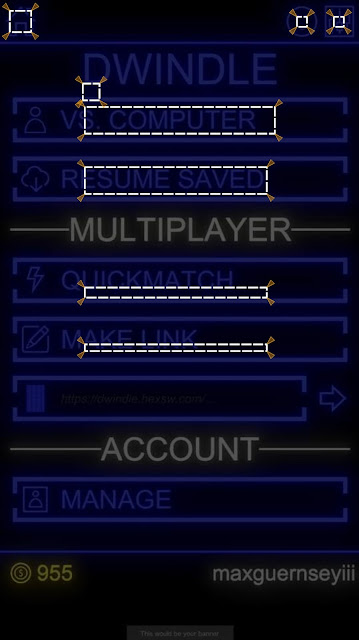
I had to do a screen grab to do this...why does the world hate SVG?
A jpg-ified version of the SVG
If you look at the gist, you can see what I did to make the little wedges without having to handcraft each one.

This leaves much to be desired but it also allows me to solve a lot of my problems.

Parsing it and computing the expected positions for an actual screen's size is pretty straightforward arithmetic. This entry is long, so I'll save that for another time so I can focus on a more interesting problem.

Defining a Test


Of course, this is just raw data. It's not a test. I need to add some context for it to be a truly useful specification. Here's a pared-down feature file.

Feature: Layout - Portrait
Background:
Given device orientation is portrait
Scenario: Position of application frame artifacts
Given main menu is active
# SNIPPED: Out of scope specifications
Then shapes conform to specifications (in file "Frame Specification - Buttons - Portrait.svg"):
| Layout Artifact | Rule |
| application return to main menu | home |
| main menu new single player game | start single player |
| main menu new multiplayer game | start multiplayer |
| main menu resume game | start resume |

What I've described, so far, allows me to set up the expected side of the tests. How do I bind it? How do I get my actuals?

It turns out the quest to do this gave me the tools to solve other problems (like using real taps instead of simulated ones).

Like everything that isn't painting a pretty picture for a first-person shooter, Unity doesn't make it easy to do this. It's not that any of the steps are difficult to do or understand. It's difficult to find what the steps are and string them together.

I take that to mean I'm doing something for which they have not planned, which is probably because not very many people are trying to do it.

For one thing, there are two complementary ways of determining an object's on-screen shape. One way works for UI elements. The other works for game objects that are not rendered as part of what Unity calls a UI. That's another problem, I'll set aside for the moment, though. Let's just stick with UI.

I already have a way of getting information about the game out of the game. That's probable another blog entry for later. Anyway, it allows me to instrument the game with testable properties and then query for those properties from my test.

Getting the Shape of Onscreen Objects


First, I need something to pass back and forth:


[DataContract]
public struct ObjectPositionData
{
  [DataMember]
  public Rectangle TransformShape;
  [DataMember]
  public Rectangle WorldShape;
  [DataMember]
  public Rectangle LocalShape;
  [DataMember]
  public Rectangle ScreenShape;
  [DataMember]
  public Rectangle ViewportShape;
}

[DataContract]
public struct Rectangle
{
  [DataMember]
  public Vector Origin;

  [DataMember]
  public Vector Right;

  [DataMember]
  public Vector Up;
  /* SNIPPED: Mathematical functions */
}

[DataContract]
public struct Vector
{
  [DataMember]
  public float X;
  [DataMember]
  public float Y;
  [DataMember]
  public float Z;
  /* SNIPPED: Mathematical functions */
}

Then I needed a way of populating it. For UI elements. That is about turning a RectTransform into its onscreen coordinates. Most importantly, I need the "viewport" coordinates, which mapped to the square (0,0)-(1,1). I could also use the screen coordinates, but both the screen coordinates and the viewport coordinates need a little massaging to be useful for the test infrastructure and the transformation for the viewport coordinates is trivial: ynew = 1 - yoriginal.

Extracting these coordinates is, of course, an obnoxious process. Everything has to be done through the camera and everything has to be treated like it's 3D - even when it's not. So, it starts by finding the "world corners" of a rectangle.

var WorldCorners = new Vector3[4];
Transform.GetWorldCorners(WorldCorners);

This seems like a weird way of doing it, to me, but I'm sure they have their reasons. It's probably something to do with performance. All the access to these kinds of properties must be from the same thread, anyway, so it's probably safe to do something like keep that array around and reuse it from one frame to the next.

Anyway. The world corners aren't good enough because those are in a 3D space that is in no way associated with the actual (or virtual) device being used in the test.

So we have to convert those corners to viewport corners and that has to be done using a camera object.

new ObjectPositionData
{
  /* SNIPPED: Other shapes */
  ViewportShape = MakeRectangle(WorldCorners.Select(V => ToTrueViewportPoint(Camera, V)))
}

static Vector3 ToTrueViewportPoint(Camera Camera, Vector3 V)
{
  var Result = Camera.WorldToViewportPoint(V);
  Result.y = 1 - Result.y;
  return Result;
}

Things like how I marshal and unmarshal the ObjectPositionData struct between the game and my tests are going to be discussed in a different article.

Binding the Test


Now I can pull that out in my test bindings. So let's start looking at those.

[DataContract]
public sealed class ShapeFileRow
{
  [DataMember] public string LayoutArtifact;
  [DataMember] public string SpecificationsFile;
  [DataMember] public string Rule = "";
}

// This one is called for the feature file shown above
[Then(@"shapes conform to specifications \(in file ""([^""]*)""\):")]
public void ThenShapesConformToSpecificationsInFile(string SourceAssetName, Table T) //5
{
  var Rows = T.CreateSet<ShapeFileRow>();
  foreach (var Row in Rows)
    ThenShapeConformsToLayoutSpecificationFrom(Row.LayoutArtifact, Row.Rule, Row.SpecificationsFile ?? SourceAssetName);
}

[Then(@"shape (.*) conforms to layout specification (.*) from ""([^""]*)""")]
public void ThenShapeConformsToLayoutSpecificationFrom(string ShapeKey, string SpecificationKey, string SourceAssetName)
{
  SpecificationKey = Regex.Replace(SpecificationKey, @"\s+", "."); // 1
  var ShapeSpecificationsContainer = TestAssets.Load(SourceAssetName, ShapeSpecifications.Reconstitute(Artifacts)); // 2
  var Requirement = ShapeSpecificationsContainer.GetViewportRequirement(SpecificationKey); // 3
  var Actual = Client.GetViewportShape(ShapeKey); // 4

  Requirement.Validate(Actual); // 6
}

There are several things of note (corresponding with numbers in comments, above).
  1. Because I'm not sure if SVG IDs allow spaces, I build my SVG ID scheme around dot-delimitation. However, that's ugly in a feature file. So I swap whitespace with dots et voilĂ .
  2. I grab test assets like the SVG spec out of assembly resources using a helper. That helper is omitted from this entry for length.
  3. Getting the shape specification object out of the document is, as already mentioned, omitted for length.
  4. Getting the viewport shape involves using the test-command marshaling system to exercise the code mentioned earlier.
  5. The table-based assertion is just syntactic sugar over the top of an individual assertion I use elsewhere.
  6. The various validate methods enforce the constraints mentioned earlier: inner boxes must be contained by actual boxes and outer boxes must contain actual boxes.

That's It, for Today


This feels like a really long entry, at this point. I've tried to be a lot more detailed, as some have requested. However, there's just no way to include all the details in one entry - any more than there would be in a single section of a single chapter of a book.

So I'm going to have to drill into more details in subsequent writings.